RA Mini Parameter Documentation
RA Mini supports the iCube series, iCube Ultra series, and C1 model.
|
Model |
Roller parameters |
| iCube Ultra (Y$3 defaults to false) |
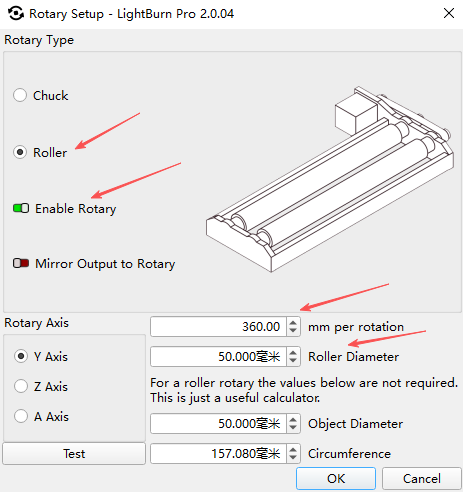
The axis of rotation is the Y-axis. Rotation 40.5mm/revolution Roller diameter 20mm No need to change motor direction (Y$3=false) After connecting the roller, you need to enter the following commands in the Lightburn console: $45=1 (Roller on) $45=0 (Roller off) |
| iCube (Y$3 defaults to false) |
The axis of rotation is the Y-axis. Rotation 40.5mm/revolution Roller diameter 20mm Motor direction needs to be changed (Y$3=true) |
| C1 (Y$3 defaults to false) |
The axis of rotation is the Y-axis. Rotation 40.5mm/revolution Roller diameter 20mm No need to change motor direction (Y$3=false) |
|
|
|
Reference Picture:
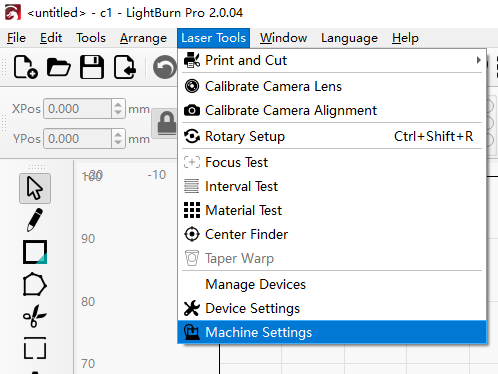
Instructions for changing the motor direction:
Open the Laser Tools - Machine Settings
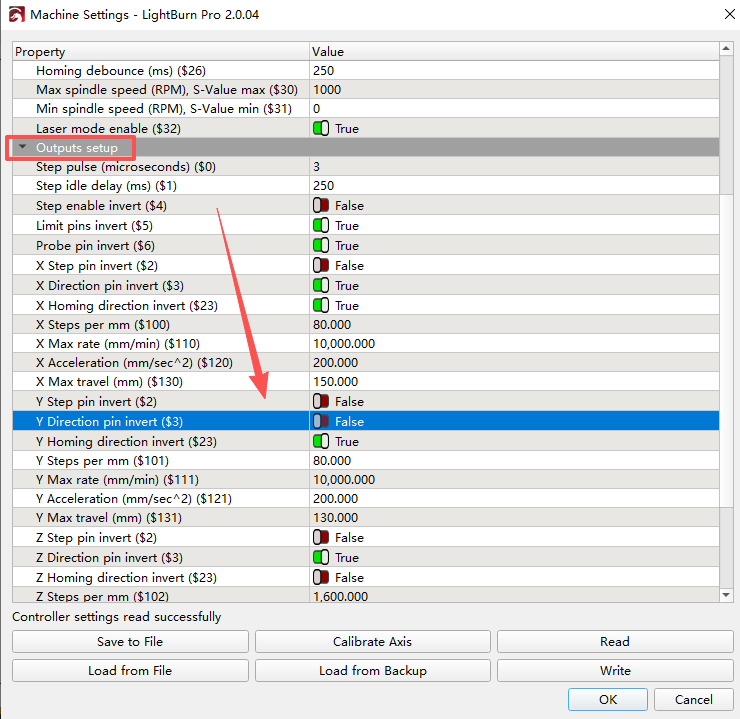
Locate the Outputs setup - Y Direction pin invert (Y$3), and switch the switch according to the machine requirements.