V5 Advanced Tutorial - Internal Carving Tutorial
This article will detail the parameters for in-body engraving. We recommend watching the instructional video: 3D Crystal Inner Engraving with V5 UV Laser | Step-By-Step Guide
Open SGD Laser, create a new canvas, and click 3D In-body Engraving to enter the in-body engraving interface.
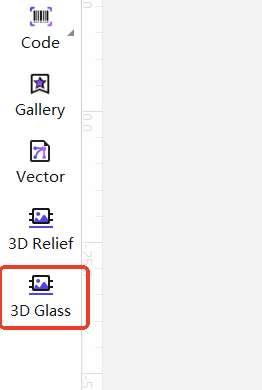
Click the folder icon in the upper right corner to import the materials.
After importing, you can edit the parameters.
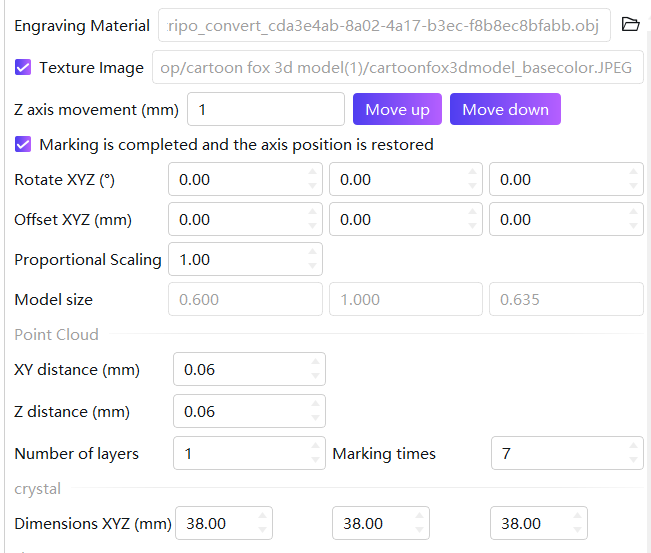
Z-Axis Movement: Software controls the movement distance of the Z-axis. Superior to side buttons on the machine but inferior to the Z-axis control knob on the column.
Restore Axis Position After Engraving: Selects whether the laser returns to its starting position after engraving is complete.
Rotate XYZ: Adjusts the model's orientation in degrees.
Offset XYZ: Adjusts the model's position in millimeters.
Proportional Scaling: Adjusts the model size proportionally to its actual dimensions.
Model Size: The size of the imported source material. Generated based on the source material's dimensions and cannot be modified.
Point Cloud
XY distance: The horizontal spacing between adjacent coordinate points within the same layer. The smaller the value, the denser the points, the richer the model details, but the longer the sculpting time.
Z distance: The vertical spacing between two adjacent layers. The smaller the value, the smoother the transition between layers, and the better the surface effect.
Number of Layers: The total number of vertical layers into which the model is divided. The more layers, the richer the details in the Z direction. The default value is 1, indicating single-layer sculpting with no three-dimensional thickness.
Marking times: The number of repeated engravings for each layer using the laser. The more engravings, the deeper the engraving depth and color of that layer, which can be used to achieve a thicker effect.
Crystal size: The size of the carved crystal; the crystal parameters sold by sculpfun are X:50mm, Y:50mm, Z:80mm.
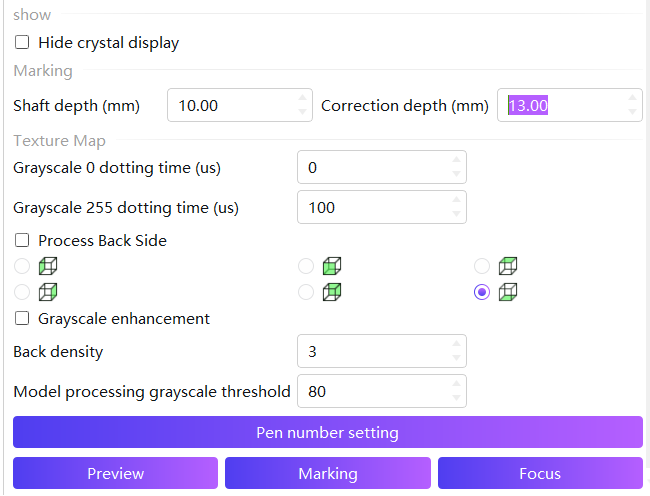
show
Hide crystal display: The yellow lines indicating the crystal frame on the hidden material are displayed.
Marking
Shaft depth: The distance that the laser lifts and moves at the beginning of engraving. It is used to set the initial focusing position of the laser.
Correction depth: The actual distance of laser lift movement. Used to compensate for depth deviations in engraving. Through these two items, the issue of inaccurate engraving position can be adjusted.
Texture Map
The texture map module supports adjusting texture effects. The system converts the imported texture into grayscale processing (grayscale value 0-255) and automatically adjusts the laser marking time according to the brightness and darkness of the image, achieving a grayscale gradient engraving effect that makes the model present richer details and a sense of layering.
This setting only appears when the model has a texture map.
Grayscale 0/255 dotting time: Set the dotting time for engraving this point based on the grayscale value. The higher the value, the deeper the engraving. A value of 0 indicates no engraving.
Process Back Side: After selection, the software will apply texture sculpting to the back of the model for density adjustment, emphasizing the front and softening the back. You can choose one of the six faces as the front face.
Grayscale enhancement: After selecting this option, the software will automatically optimize the grayscale contrast of the image, making the light and dark levels clearer.
Back density: Adjust the density of the sculpting points on the back of the model. The higher the value, the denser the points.
Model processing grayscale threshold: Set the binarization threshold for grayscale images. Areas with grayscale values above this threshold will be engraved, while those below the threshold will not be engraved.
Click on the pen number settings to configure the laser parameters; more detailed parameter settings are available in the advanced settings.
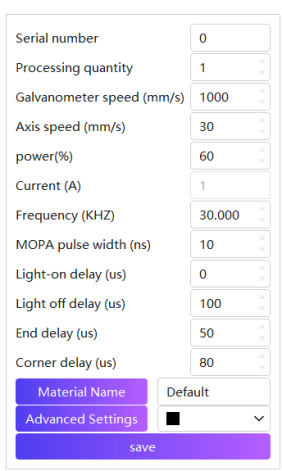
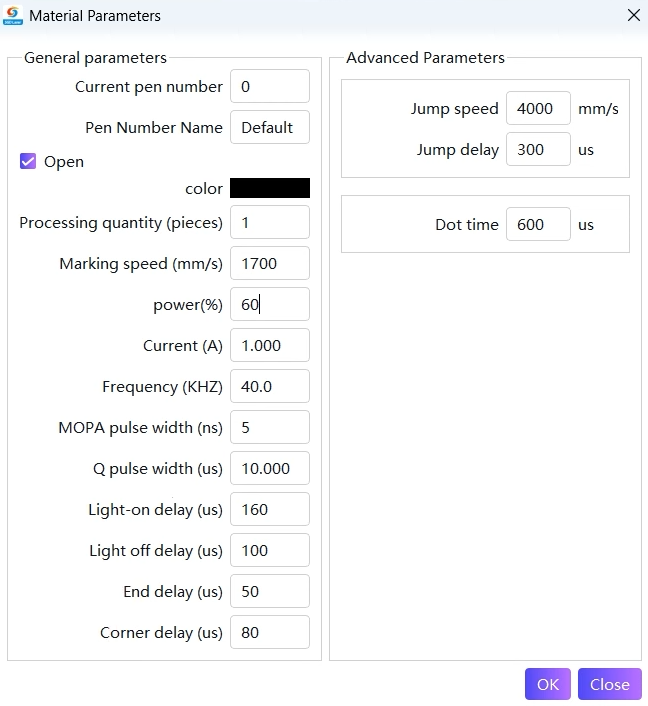
Marking speed (mm/s): The moving speed of the laser head during engraving. Faster speed leads to higher engraving efficiency, but may result in rougher details; slower speed is conducive to fine engraving, but less efficient, requiring a balance between speed and effect.
Power (%): The proportion of laser output energy. Higher power means stronger laser energy, resulting in deeper engraving marks; lower power results in shallower marks. Too high a power can easily cause the crystal to crack, while too low a power may not allow for effective engraving.
Frequency (KHZ): The number of laser pulse emissions per unit time. At high frequencies, the pulses are dense, resulting in coherent and delicate engraving lines; at low frequencies, each individual pulse has high energy, making it suitable for deepening marks. Adjustments should be made based on the crystal material and engraving requirements.
Q Pulse width (μs): The duration of a single laser pulse. Pulse width affects the peak power and energy output of the laser. A narrow pulse width results in high peak power, making it suitable for fine engraving of tiny structures. A wide pulse width releases energy gently, preventing crystal cracking.
Light-on delay: After the galvanometer starts moving, how long is the delay before triggering the laser to emit light, which is used to avoid distortion during the acceleration phase of the galvanometer.
Light off delay: The time period before the galvanometer stops moving during which the laser is turned off, to prevent distortion during the deceleration phase of the galvanometer.
End delay: After the laser path is completed, specify the delay time before proceeding to the next action to ensure the processing is fully completed.
Corner delay: The additional delay time when the galvo mirror slows down at the corner, ensuring the engraving accuracy and uniformity at the corner.
Jump speed: The speed at which the galvanometer moves between two non-consecutive engraving points. The faster the speed, the higher the overall processing efficiency.
Jump delay: After the galvo mirror completes the jump movement, how long should there be a delay before starting the light-emitting engraving, to allow the galvo mirror to stabilize at the target position.
Dot time (μs): The duration of laser action on a single point of crystal. Longer duration results in more accumulated energy at a single point, which is brighter but may be larger in size; shorter duration results in a dimmer and smaller point, used to adjust the brightness and shading levels of patterns in internal carving.
After editing, click "Save" to save the parameters within the software. If you are using crystal accessories purchased from SculpFun officially, you can directly use the setting parameters shown in the diagram. These parameters were tested in a laboratory environment and are for reference only.